When Search Needs to See
What we learned from comparing text RAG, managed multimodal search, and multimodal embeddings on the same corpus
Over the past few weeks, many people in our community have shared the challenges they are running into while building multimodal search for their products.
Their search systems work reasonably well for text, but struggle when important information appears inside tables, charts, diagrams, scanned pages, images, or multi-format data.
So, how should we approach search when the information is not only text?
Rather than looking at multimodal search only at the model level, we built three complete retrieval pipelines and tested them on the same corpus and the same set of queries:
- Text-only RAG using OpenAI embeddings and LanceDB
- Managed multimodal search using Mixedbread
- Multimodal retrieval using Voyage embeddings, metadata, and LanceDB
Our goal was to understand what each approach makes easier, where it struggles, and what tradeoffs a team should consider before choosing one. We were not trying to find one universally best solution. There probably is not one.
What we will cover
We evaluated the three pipelines using the same small healthcare corpus, manually verified relevant results, and retrieval metrics.
In this article, we will cover:
- some details about the data we used
- how we created the ground-truth evaluation set
- which metrics we chose and why
- three different retrieval pipeline approaches
- how each retrieval pipeline worked
- what the results revealed
The corpus we used
We used a small healthcare corpus containing three research papers and six standalone medical images.
The corpus gave us a useful mix of text-heavy PDFs, tables, charts, architecture diagrams, chest X-rays, and a CT scan. We chose healthcare only as a practical example. The evaluation process and lessons apply much more broadly across other domains.
The data had 41 page-or-image items in total:
- 35 PDF pages
- 6 standalone medical images
We chose a corpus with different kinds of information. Some answers were clearly available in extracted text, while others were communicated mainly through page layout, diagrams, or images with little or no searchable text.
The corpus was small enough for us to inspect manually, but varied enough to expose some of the common problems teams encounter with multimodal search.
In a real product, teams will usually already have a corpus. The important step is understanding what it contains: which formats are present, where does the important information live, is that information available in text, images, layout, metadata, or a combination of them, and what types of evidence do users expect the search system to retrieve?
Answering these questions determines which retrieval approaches are worth evaluating.
Creating the ground-truth evaluation set
The next step was deciding what a successful retrieval result should look like.
We created 12 evaluation queries across five categories: text, tables, charts, figures, standalone images.
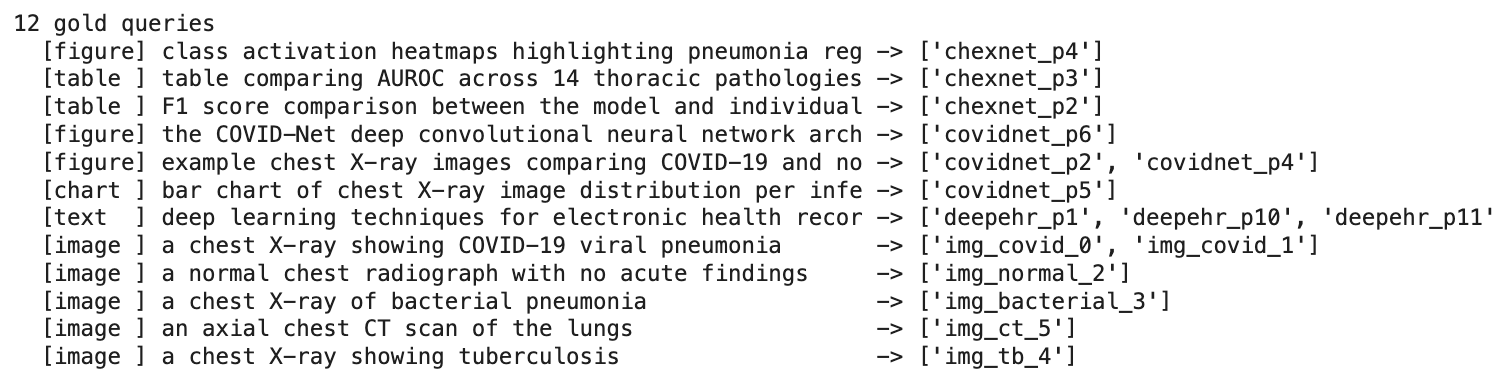
The queries were written to reflect the different kinds of evidence available in the corpus.
For every query, we manually inspected the corpus and identified the pages or images that should count as relevant.
A simplified ground-truth record looked like this:
{
    "query": "the COVID-Net architecture diagram",
    "type": "figure", (for different queries, answers belonged to table, chart, images, or text)
    "gold": {"covidnet_p6"}
}
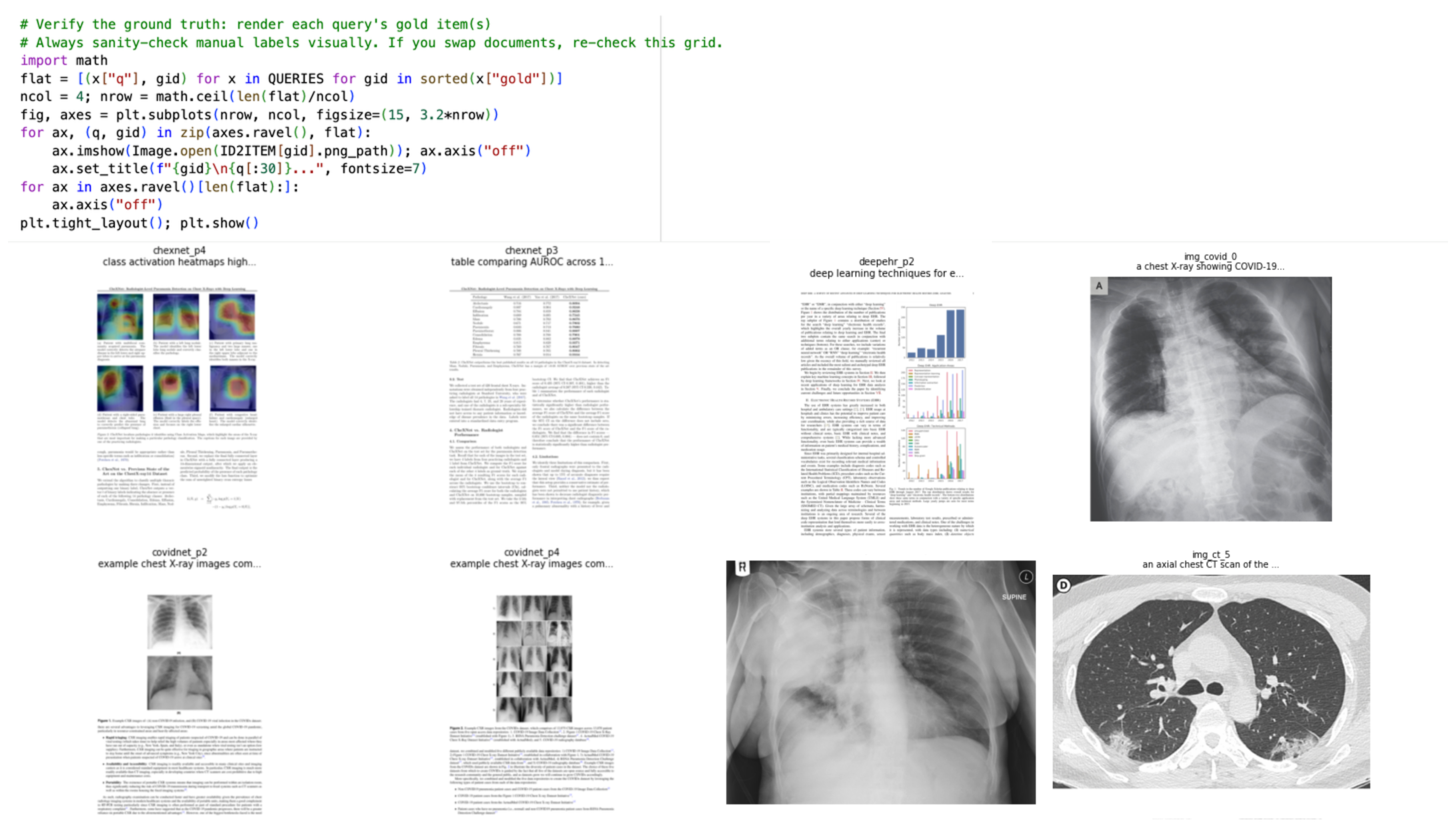
The gold field contained the IDs of all known relevant results for that query. Some queries had one relevant item, while others had several.
We used page-level IDs for PDF content and image-level IDs for standalone images. This gave all three pipelines a shared evaluation format: query → ranked list of page or image IDs
That common format was important because the pipelines did not index the corpus in the same way. The text-RAG system searched smaller text chunks, while the multimodal systems worked primarily with complete pages or images. For evaluation, the retrieved results needed to map back to the same page-or-image units used by the ground truth.
Each query's gold data when visualized looks like this:
How to create ground truth for your own product
You do not need a large benchmark to begin evaluating retrieval. A small, carefully reviewed set of realistic queries is often a better starting point.
A practical process is:
- Collect queries that represent real user needs.
- Include different query types and known failure cases.
- Decide what one retrieval result represents.
- Manually inspect the corpus for each query.
- Record every result that should count as relevant.
- Assign useful categories, such as document type, query type, or customer workflow.
- Review retrieved results that were not originally labeled, since the system may surface relevant evidence you initially missed.
The quality of the ground truth matters more than the number of queries. If the relevance labels are incomplete or inconsistent, the retrieval metrics will also be misleading.
Choosing the evaluation metrics
Deciding on evaluation metrics early is useful because it forces us to define what good retrieval actually means for the product.
Without that, it becomes impossible to understand whether an improvement in an offline benchmark will matter to users.
We wanted the metrics to answer four practical questions:
- did the system retrieve at least one relevant result
- how much of the relevant evidence did it retrieve
- how much noise and irrelevant data appeared near the top results
- how far down the ranking we had to go before finding something useful
That led us to four metrics:
| Metric | Practical Example | Why this metric matters |
|---|---|---|
| Hit@5 | A customer support chatbot searching a company's knowledge base. It only needs to find one article that contains the answer so it can respond correctly. | The system succeeds as long as at least one relevant document is retrieved. |
| Recall@5 | A lawyer performing legal discovery before a court case. Missing a single relevant contract, email, or piece of evidence could weaken the case. | Missing relevant documents is costly, so the goal is to retrieve as many relevant documents as possible. |
| MRR@10 | An e-commerce website like Amazon. If the product a customer wants appears as the first or second result, they're much more likely to click it than if it's buried lower down. | The first relevant result should appear as early as possible. |
| Precision@5 | A pharmacist searches for dosing guidelines for a specific medication. If the top results include dosing information for a different drug with a similar name, selecting the wrong document could result in an incorrect dosage being prescribed. Here, irrelevant results can directly impact patient safety, making high precision essential. | The retrieved results must be highly relevant, because irrelevant information can lead to poor decisions. |
What metric is best varies based on the product. If one good source is enough, Hit@k and MRR work well. If the task requires gathering evidence from several documents, Recall@k becomes more important. If irrelevant context increases cost or hurts answer quality, Precision@k helps.
It is important to decide this before comparing the systems, based on how retrieval will actually be used.
Now let's get started with our experiment with three different retrieval pipelines.
Approach 1: Text-only RAG with OpenAI and LanceDB
We started with a conventional text-RAG pipeline because this is still the default setup for many teams.
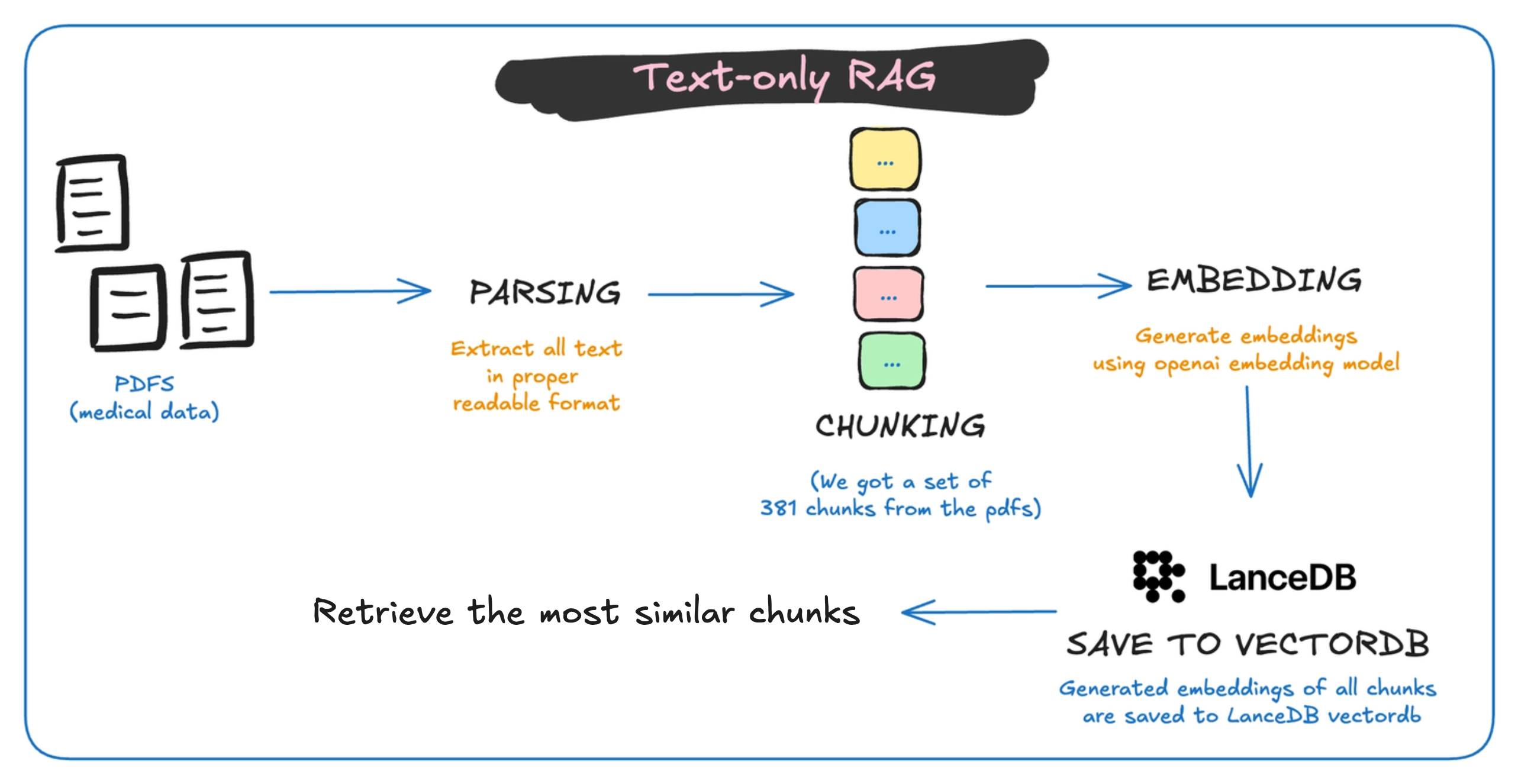
We used OpenAI's text-embedding-3-small model for the embeddings and LanceDB as the vector database.
We chose LanceDB because a number of people in our community are already using it in their search and RAG projects. It is also easy to run locally and gives us direct control over the schema, metadata, and retrieval logic. The same setup could have been implemented with other vector databases such as Qdrant, Weaviate, Pinecone, or Vespa.
The three PDFs produced 381 overlapping text chunks. Each chunk retained its source document and page information so that retrieved chunks could be mapped back to the original page. We then ran the pipeline on all 12 queries from our evaluation set.
The text-RAG pipeline achieved:
| hit@k | recall@k | precision@k | mrr |
|---|---|---|---|
| 0.583 | 0.521 | 0.183 | 0.382 |
It often worked when the relevant page contained enough searchable text around the visual. For example, a chart or architecture diagram could still be retrieved if its caption, title, or surrounding paragraph described what was shown.
Looking at the failures:
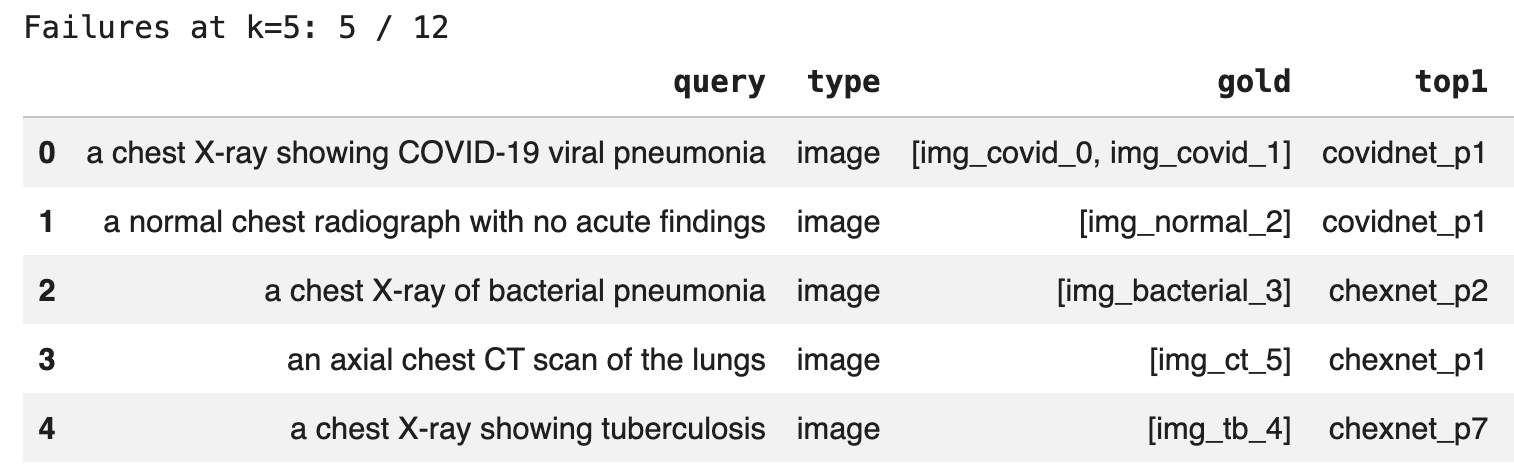
The pipeline failed on 5 of the 12 queries at the top-five cutoff.
All five failures were standalone image queries. In each case, the top result came from one of the PDF pages (check top1 column in the figure) rather than the standalone image we had labeled as relevant.
The system could retrieve pages containing prose, table text, figure captions, or surrounding explanations. In some cases, it could find a page with a chart or diagram because the extracted text described what was shown.
But it could not directly understand the visual content itself.
The text-RAG system only indexed extracted text from the PDFs. The standalone X-rays and CT scan had no text representation, so they were invisible to the retriever.
For text-heavy collections, this approach may still be enough. But once users expect search to work across images, figures, scans, or visually rich pages, text extraction alone can become the bottleneck.
Approach 2: Managed search with Mixedbread
The text-RAG baseline made the first limitation clear: standalone images were not represented in the index at all.
For the second approach, instead of building and maintaining the full retrieval stack ourselves, we used Mixedbread as a managed search system.
The workflow was much simpler:
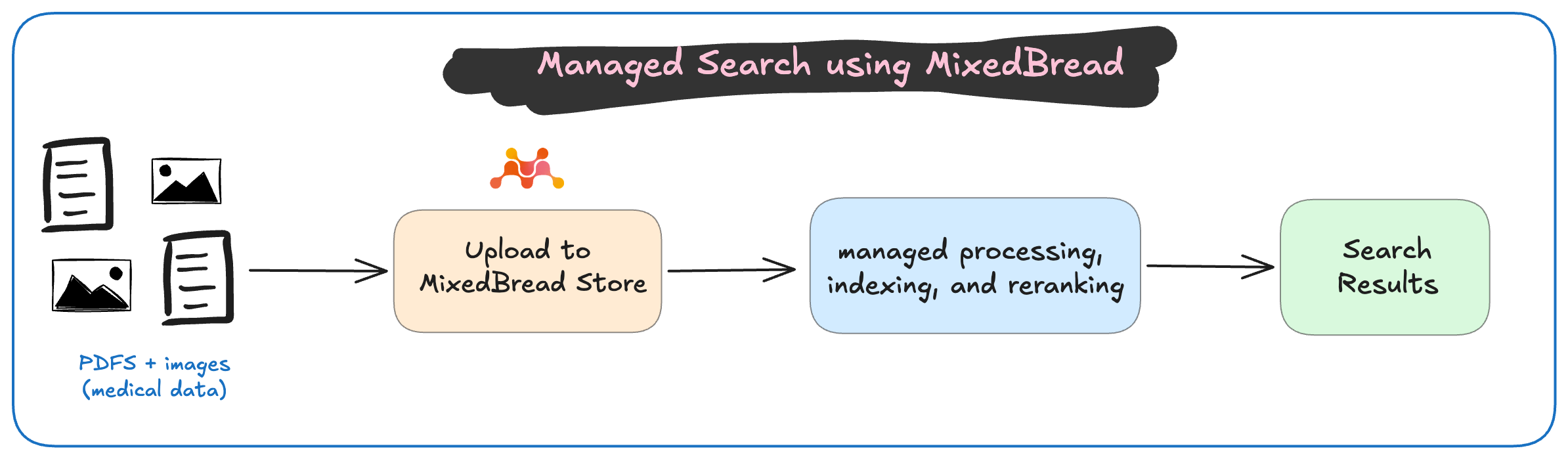
We uploaded the same three PDFs and six standalone medical images used in the first experiment. Unlike the text-RAG pipeline, we did not manually extract text, create chunks, generate embeddings, or build a vector index. Mixedbread handled those steps internally.
Many teams do not want to own every part of document parsing, multivector representation, indexing, reranking, and retrieval. A managed system can remove a significant amount of infrastructure work.
We also kept the file metadata simple:
metadata={
    "source_file": path.name,
    "source_stem": path.stem,
    "modality_hint": "pdf" if path.suffix == ".pdf" else "image",
}
Mixedbread returned its own result objects, including filenames, page indexes, OCR text, scores, and metadata. For each query, we got answers like this:
We added a small adapter to convert those results back into the same page and image IDs used by our evaluation set. That allowed us to run the same 12 queries and score the results with the same metrics.
The managed Mixedbread pipeline achieved:
| hit@k | recall@k | precision@k | mrr |
|---|---|---|---|
| 0.833 | 0.734 | 0.25 | 0.694 |
This was a clear improvement over the text-only baseline across all four metrics. The largest difference appeared on image queries.
Text RAG had a Hit@5 of 0 for standalone images because those images had no visual representation in its index. Mixedbread was able to search the original image files directly, so it retrieved relevant results for three of the five standalone-image queries.
It also achieved a Hit@5 of 1.0 for the chart, figure, table, and text categories in our eval.
Let's look at the failures:

Mixedbread failed on 2 of the 12 queries at the top-five cutoff. Both relevant images appeared at rank 6.
This is a why looking beyond a single cutoff matters. Hit@5 counts both queries as failures, while MRR@10 shows that the relevant result was still found reasonably early.
The main appeal of this approach was the reduction in implementation work. We did not need to manage parsing, OCR, page rendering, embeddings, chunking, vector storage, or reranking ourselves. We uploaded the original files and searched the Store.
The tradeoff was less control and visibility into the internal retrieval pipeline.
Approach 3: Voyage multimodal embeddings with LanceDB
For the final approach, we wanted the visual coverage of a multimodal system while keeping control over the retrieval pipeline. So we built the pipeline ourselves using Voyage multimodal embeddings and LanceDB.
The setup looks like this:
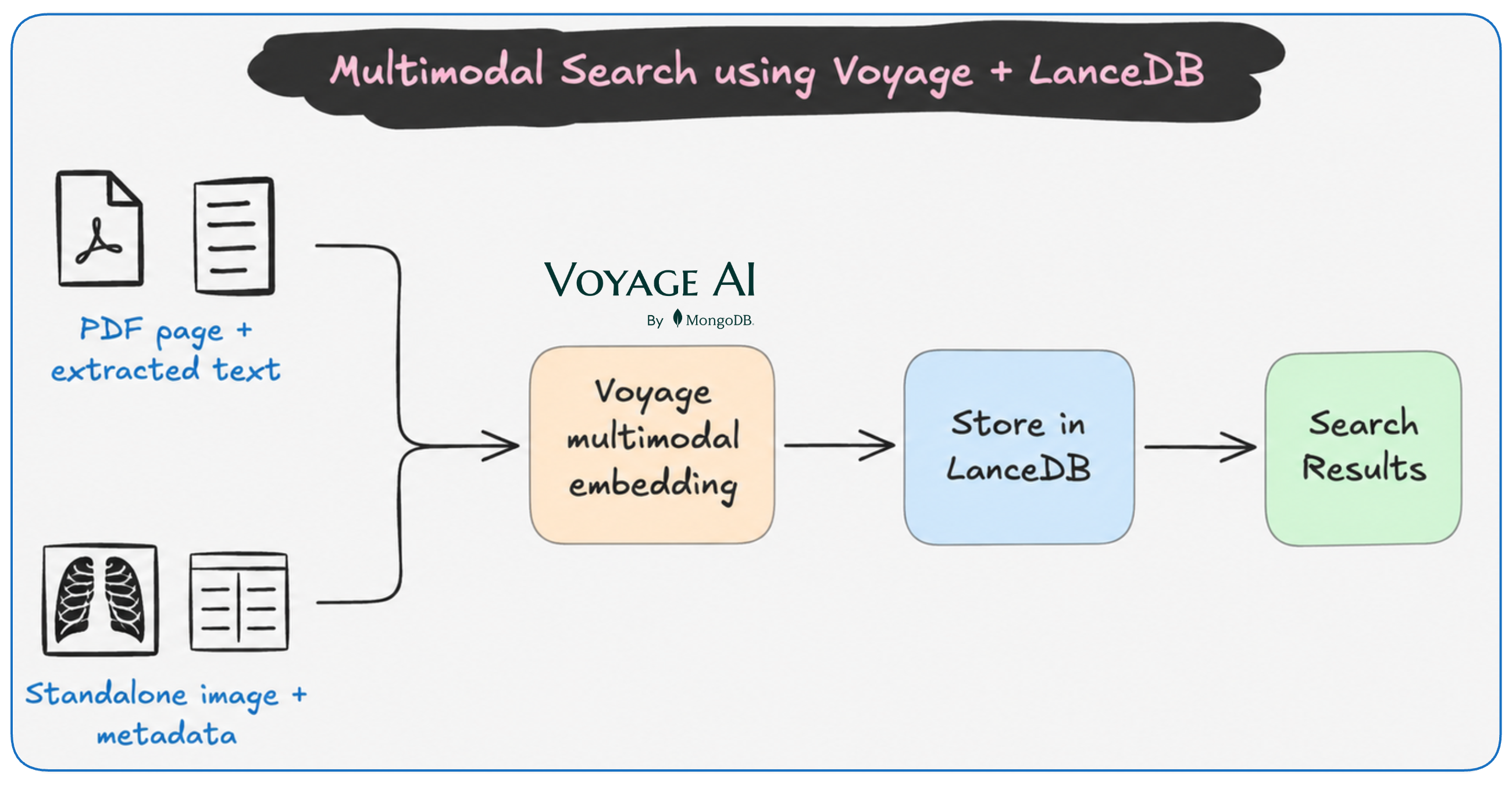
For PDF documents, we rendered each page as an image and combined it with the extracted page text before generating the embedding.
This was important because the two signals capture different things. The extracted text helps with prose, captions, and table contents, while the rendered page preserves visual structure such as layout, diagrams, charts, and embedded images.
For standalone medical images, we embedded the image together with a small amount of verified metadata, such as the image modality and dataset category.
For example:
["Medical image. Modality: xray. Tags: bacterial.", image]That is why we refer to this approach as Voyage + metadata + LanceDB. It was not a pure image-only retrieval setup. The model could use both the visual content and the metadata available at ingestion time.
Using metadata is quite beneficial in production systems. Many teams already have trusted fields such as document type, product category, department, author, date, modality, or content labels which can be useful retrieval signals.
A different retrieval unit
The text-RAG pipeline indexed 381 text chunks. In the Voyage pipeline, each row represents one complete PDF page or one standalone image.
The final index therefore contained 41 items: 35 PDF pages and 6 standalone images
We used LanceDB again so that the storage layer remained familiar across the custom pipelines. The main variable was not the vector database, but the representation being stored inside it.
We ran the same 12 queries against the Voyage index, and the results were:
| hit@k | recall@k | precision@k | mrr |
|---|---|---|---|
| 1.000 | 0.943 | 0.300 | 0.917 |
This pipeline returned at least one relevant result in the top five for every query. It also performed consistently across the different query types, including text, tables, charts, figures, and standalone images.
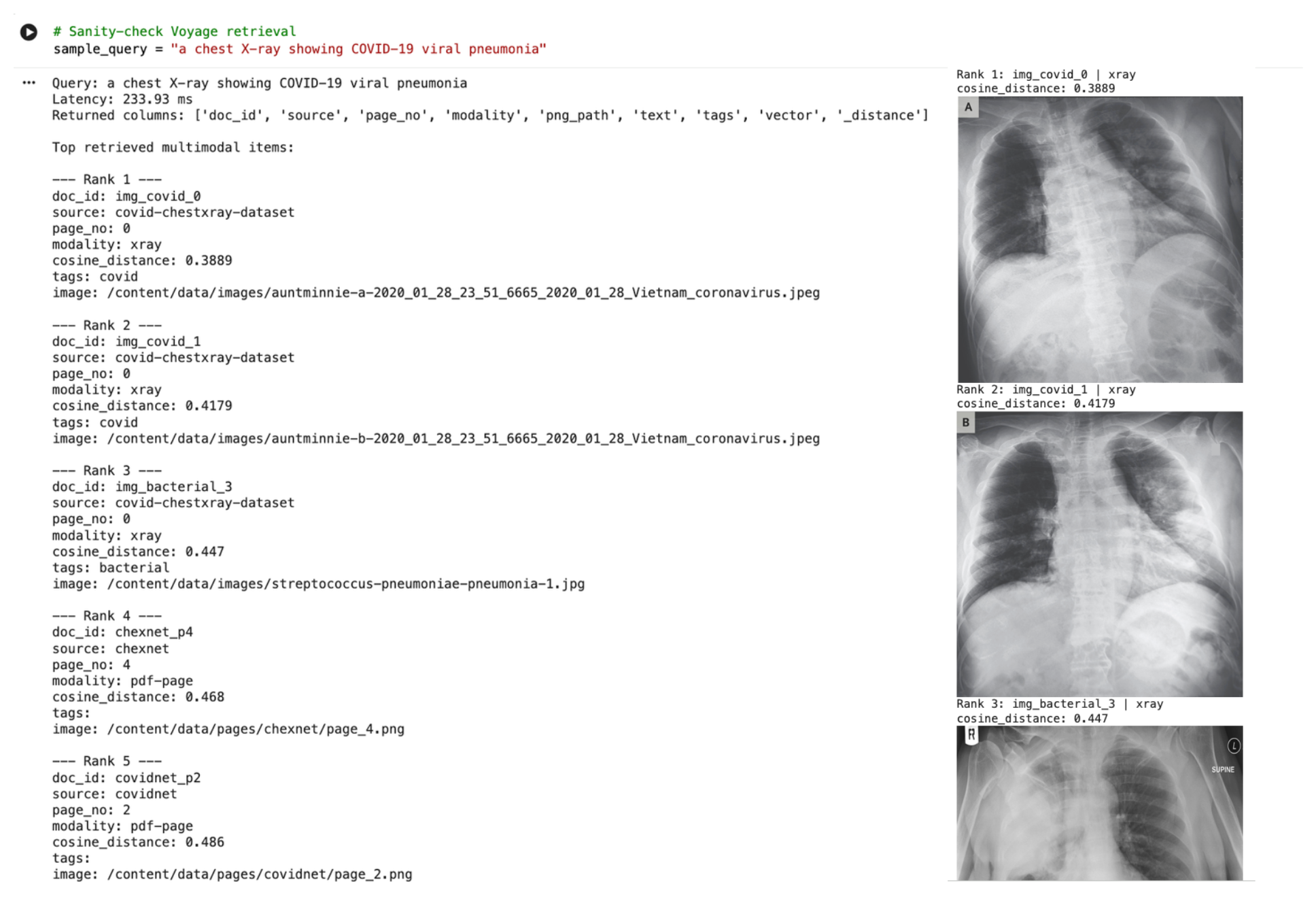
For example, for the query: "a chest X-ray showing COVID-19 viral pneumonia", the top results included the two relevant COVID-19 X-rays, followed by related medical images and pages from the research papers.
Why did the multivector approach not come out on top?
Mixedbread's Wholembed v3 uses late interaction. Instead of compressing an entire page or image into a single vector, it preserves multiple local representations and compares the query against them individually.
That generally helps retain fine-grained details that may be lost in a single-vector representation. But multivector retrieval is not automatically the best fit for every evaluation.
The final ranking still depends on more than the representation itself. It is also affected by the model, retrieval unit, available metadata, reranking strategy, query mix, and relevance labels.
So the result is not that multivector retrieval is weaker. It is that a sophisticated representation alone does not guarantee the highest score when another pipeline is more closely aligned with the data, metadata, and evaluation design.
Conclusion
We started this experiment because many people in our community were running into the same problem: their search systems worked well for text, but became much less reliable once the important information lived inside images, diagrams, tables, or scanned pages.
Comparing all the different pipelines that we tried:
| approach | index_rows | embedding_dim | hit@k | recall@k | precision@k | mrr |
|---|---|---|---|---|---|---|
| Text RAG + OpenAI embeddings + LanceDB | 381 | 1536.0 | 0.583 | 0.521 | 0.183 | 0.382 |
| Mixedbread managed search | NaN | NaN | 0.833 | 0.734 | 0.250 | 0.694 |
| Voyage multimodal embeddings + LanceDB | 41 | 1024.0 | 1.000 | 0.943 | 0.300 | 0.917 |
Voyage produced the strongest results in this experiment, but this does not mean that dense multimodal embeddings will always outperform managed search or late interaction.
We compared complete retrieval pipelines, not isolated model architectures. The Voyage setup was particularly well aligned with our corpus and evaluation: PDF pages included both visual and textual information, and standalone images included verified metadata.
This is also one of the broader lessons from the experiment.
Before committing to a retrieval architecture in production, test a few plausible pipelines on a small, representative sample of your own data. The best approach still depends on the corpus, query patterns, metadata, and product requirements. So, look at your data, test, and then decide what works the best for you.
A practical way to approach the decision is to start small:
- Take a representative sample of your real data.
- Write a small set of realistic queries.
- Manually identify the results that should be retrieved.
- Choose metrics based on how search will be used.
- Compare a few plausible pipelines.
- Inspect the failures.
There is no single best way to approach search. But there is a much better way to decide what is likely to work for your product: test it on the data and failures that actually matter.
The full notebook for this experiment: Google Colab